Local MCP gateway for centralized tool management and token savings
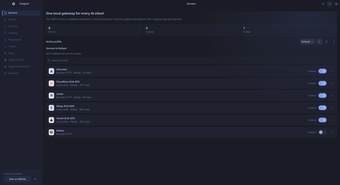
toolport, developed by Btsouth, is a local MCP control plane that exposes multiple MCP servers through one port. It lets AI clients connect to a single local gateway that centrally manages discovery, authentication, and agent instruction rules without per-client edits. Key capabilities include on-machine secrets storage, integrity checks, dynamic registration, and cross-client agent rules. The tool targets developers and AI power users who manage local scripts and LLM-integrated tools.
Acts as a single on-machine gateway for MCP tools
Toolport consolidates disparate MCP servers behind one local port so multiple assistants access the same tool set. It hosts any MCP-compliant tool, from text-localization scripts to coding helpers and data-analysis utilities, and presents a unified service endpoint for clients. This centralization reduces the need to maintain separate server addresses or configuration files per assistant and simplifies discovery for multi-tool environments.
Significantly lowers prompt context with lazy discovery
The tool implements a lazy discovery mode that exposes tool definitions to the model only when needed, which the documentation quantifies as up to 90% token savings. That behavior reduces context-window overhead by avoiding large tool lists in every prompt; the mechanism therefore directly affects how much model context is consumed during multi-tool interactions.
Maintains local governance for secrets and tool integrity
Secrets are stored in the operating system's native keychain rather than plaintext configuration files, and the gateway performs tool fingerprinting and quarantine to detect altered definitions. Those measures give teams a verifiable integrity layer for locally hosted tools: modified or unexpected binaries can be isolated, and credentials remain managed by the OS credential store.
Integrates with developer workflows but needs compatible hosts
Toolport supports dynamic tool registration and discovery without restarting clients, and it centralizes agent rules (for example, AGENTS.md and .goosehints) so instructions apply across assistants. Installers and packages cover Windows, Linux (AppImage and native packages), and macOS. The gateway requires an MCP-compatible host application to function, so it plugs into existing MCP-capable clients rather than acting as a standalone LLM client.
Practical infrastructure for teams invested in the MCP ecosystem
Toolport is a practical choice for developers and teams working inside the emerging MCP ecosystem; btsouth's related projects and community focus indicate ongoing ecosystem work. The tool's value depends on the availability and maturity of MCP-compatible clients and workflows within a team. For groups already standardizing on MCP, it centralizes governance and reduces operational friction when managing multiple local tools.